Attendance captured at the gate, wages computed by the rule book, and a bill built from the very same data.
CMABS is our Contractor Manpower Attendance & Billing System — built for companies that run warehouses, plants and distribution centres on contract labour and cannot presently prove what they are invoiced for. It records every punch, applies your statutory rules, and produces the bill and the payslip from one set of numbers instead of three spreadsheets.
Most contract-labour disputes are not about rates. They are about headcount, days and overtime — three numbers nobody on either side can evidence a month after the fact.
The usual arrangement is that a contractor keeps a register, the site keeps a gate book, finance receives a PDF invoice, and the three are reconciled by argument. Nobody is being dishonest; there is simply no shared record. A worker who left at midday still shows a full day on the biometric printout. Overtime gets claimed that nobody remembers approving. A Sunday is billed for someone who was absent on the Saturday and the Monday. Each of these is small; across a few hundred workers and twenty locations they are not.
CMABS closes the loop. Attendance is captured where the worker actually is — a QR badge scanned at the gate, a punch from the supervisor's phone, or an import from the biometric machine you already own. Those punches, and nothing else, drive the day count. The day count drives the payroll. The payroll drives the bill. When the contractor's invoice arrives, the system has already computed what it should say, and the variance screen shows you the difference line by line before anyone approves a payment.
It is built as a proper system of record rather than a calculator: soft deletes, a full audit trail, role-based access with location fencing, and every statutory rate held in configuration so the numbers can be defended to an auditor rather than explained.
Every module hands verified data to the next. Nothing is re-keyed, so nothing can quietly disagree.
Company, contractors, locations, customers, warehouses, shifts, departments, designations, holidays, rate cards and users — thirteen masters driven from one metadata-defined engine, so a new field is a configuration change rather than a new screen.
Registration, HR approval, modification requests, exits and re-inductions. Bulk onboarding by CSV with a validation report before anything is committed, and a printable QR badge issued per worker.
Four routes into the same register — QR badge scan, manual capture by a supervisor, bulk CSV upload, and biometric machine import. Punches alternate IN and OUT, worked hours are summed from completed sessions, and overnight shifts are handled properly.
Any hours past shift end raise an approval request automatically — whichever route recorded them. Until someone approves it, that overtime does not exist for payroll or for billing.
Fixed components earned against paid days, gross payable, employee deductions, employer contributions, total CTC, management fee and total billing — reproducing your contractor's own wage sheet column for column.
Cost per worker apportioned across locations by that location's share of present days, so a worker who moved mid-month bills to the right cost centre without anyone splitting it by hand.
The contractor uploads their invoice; the system shows theirs against its own computation, per employee, with a reconciliation banner that surfaces any drift. Verify, finalise, then pay — each a separate, audited decision.
A scoped self-service area where the contractor manages their own workers, watches their own attendance, raises overtime, uploads invoices and tracks billing — seeing their data and no one else's.
Five boards written for five audiences — executive, finance, location, contractor and customer — rather than one dashboard everybody has to reinterpret.
Thirty standard reports across manpower, attendance, overtime, billing, invoices, compliance and audit — each filterable by period and exportable.
Any system can add up hours. These are the specific rules that decide whether a bill is right — and CMABS applies each of them in exactly one place, so they cannot drift apart.
There is no separate per-designation monthly rate to fall out of step. The bill is Basic, HRA, Conveyance, Leave with Wages, Statutory Bonus and the rest — the same components the worker is actually paid on.
Unapproved overtime is invisible to payroll and to billing. Every capture route queues its approval, so no overtime can exist that nobody could ever have signed off.
For machine-recorded days the status is re-derived from hours worked — 75% of the shift is Present, 40% is Half Day, below that Absent. A half day bills as half, and 28.5 paid days stays 28.5.
A weekly off is a paid day until the calendar day before and after are both absences. Declared holidays are never struck out. The rule lives in one place and every register obeys it.
Gross earnings already contain the worker's own PF, ESI and professional tax. The billable cost adds the employer's contributions on top. Billing screens use cost; payslips use the wage. They are never mixed.
A location-scoped user's fence is written into the update itself, so an out-of-scope approval is not just invisible — it is a no-op. Six roles, ten modules and a per-role home page.
These are the details that turn a plausible payroll into a defensible one. Each rate, ceiling and wage base is configuration, because every contractor states them slightly differently and the system has to reproduce their sheet exactly.
CMABS is one integrated application, not a bundle of tools bolted together — every module below reads the same masters, obeys the same role and location fencing, and writes to the same audit log. A number recorded in attendance is the number payroll uses, and the number the invoice is checked against.
Head-count, active employees, present and absent counts, OT hours, invoiced value and pending invoices across every location, with attendance split and manpower share charts.
Performance by contractor — manpower supplied, attendance achieved, overtime raised and billing position, so a weak supplier is visible before renewal.
Site-level view of deployed manpower, attendance percentage and cost, for the manager who is accountable for one warehouse rather than all of them.
For 3PL operators — manpower and cost grouped by the end customer whose warehouse the workers are deployed in, ready to pass through in your own billing.
Invoice pipeline by status — raised, under review, approved, disputed and paid — with invoiced value and the variance still unresolved.
The legal entity the system runs for — identity, statutory registrations and the defaults every other master inherits.
Each manpower supplier with contact, agreement dates and the login that opens their self-service portal. Agreement expiry is a standing report.
Every site where workers are deployed. Location is the fence for scoped roles and the unit that manpower cost is apportioned across.
The end client a location serves, so a 3PL can report and bill manpower by the customer whose goods are being handled.
Physical warehouses within a location, each mapped to its customer and vendor relationships.
Which contractors are approved to supply manpower to which warehouse — the link that stops a worker being deployed somewhere their contractor has no agreement.
The contractor-to-customer mapping used when one supplier serves several end clients from the same site.
Shift patterns with start and end times, the hours that define a full day, the weekly-off day and support for shifts that cross midnight.
Operational departments used to group deployment and to report manpower by function.
Work roles such as Picker, Loader or Labour, each carrying its default salary component template for new joiners.
Declared holidays maintained per location, because a national list rarely matches what a particular site actually observes.
Reference commercial rates per designation, kept for comparison and negotiation. Money is never computed from it — the salary structure is the bill rate.
System users with their role, the location they are fenced to, and the module access that role grants. Blank location means all locations.
The full contract workforce with employee code, contractor, deployment, designation, shift and statutory identifiers, filterable and exportable.
Onboarding raised by the contractor and approved by HR — identity, Aadhaar, gender, date of birth, joining date, deployment and shift, with the QR code generated on save.
Version-controlled per worker with effective-from and effective-to dates. Basic, HRA, Conveyance, Leave with Wages, Statutory Bonus and the rest — and this is what the bill is computed from.
Change requests against an active worker — transfer, designation change, shift change or salary revision — routed for approval rather than edited in place.
Exit requests with last working day, feeding the Exits and Inactive register. Records are archived, never deleted, so history stays intact.
One queue for pending registrations, exit requests and salary revisions, with one-click approve or reject and a bulk CSV route for peak intakes. Payroll keeps paying the previously approved structure until a revision is decided.
Every day record with date, employee, contractor, location, shift, first IN, last OUT, worked hours, OT hours and status — searchable and exportable.
Manual attendance recorded by a supervisor for a damaged badge, a new joiner or a correction, tagged with who recorded it.
A whole day or period loaded by CSV, validated row by row with every rejection reported before anything is written.
Upload the reader's monthly status report exactly as exported. It is validated against the masters first — unknown contractors or employee codes reject the whole file rather than half-importing. Re-uploading the same period updates rather than duplicates.
Paid non-working days — holidays maintained by location, weekly offs by shift — with bulk upload for both and a month view showing exactly which days are paid.
Hours beyond shift end raised automatically by every capture route, flowing Supervisor to Location Manager to Approved, with bulk approve, reject and export.
For machine-recorded days the status is re-derived from hours actually worked — Present, Half Day or Absent — so a printout that says P for someone who left at midday does not pay a full day.
Month and contractor selected, then generated — employees, gross earnings, employee deductions, net payable, employer contribution, total CTC, management fee and total billing, all on one screen.
Fixed components apportioned over the days in the calendar month, never over the days that happen to have attendance rows. Half days count 0.5 and the total is never rounded.
Employee and employer shares computed on the configured wage base, rounded to the nearest rupee and capped at the configured ceiling.
Always rounded up, with coverage judged on the fixed monthly wage rather than the earned one, so a short month does not accidentally bring someone into scope.
State slab based and gender-dependent, so an unrecorded gender correctly produces no deduction instead of a wrong one.
A flat half-yearly contribution applied only in the two months it is actually due, not spread across the year.
Per-worker payslips showing earned components, deductions and net pay — the wage the worker receives, kept distinct from the cost the client is billed.
Rates, ceilings and which components form the PF and ESI base are all settings, because every contractor states the base in their own bill sheet and payroll has to reproduce it exactly.
Generated for a billing month from each worker's salary structure, attendance and approved OT. Only approved overtime is billed, and every line is traceable to the worker it came from.
A worker's monthly cost split across locations by each site's share of their present days, so someone who moved mid-month lands on the right cost centre without manual splitting.
The contractor uploads their own invoice document against a billing period and location, stored with the verification record rather than sitting in an inbox.
Invoice claims against system figures on four metrics — manpower, attendance hours, approved OT and amount — each marked Matches or Mismatch, with the per-worker register underneath as evidence.
Where the two disagree and why — unapproved overtime that was claimed, a half day billed as full, a sandwiched weekly off — surfaced before anyone approves payment.
Verify, finalise and mark paid as three separate audited decisions, each carrying the location fence inside the update so an out-of-scope action simply does nothing.
The contractor's own workforce, pending approvals, present count, OT hours, invoices raised and invoiced value — scoped to their data and nobody else's.
Their deployed workers with status, designation and location, so headcount questions are answered without a phone call.
New joiners raised directly by the contractor, entering your HR approval queue rather than arriving as an email attachment.
Whole intakes onboarded by CSV with a validation report, for a peak season that needs a hundred workers in a week.
Read-only visibility of the attendance recorded against their workers — the single most effective way to stop month-end disputes.
The contractor raises overtime for approval; it is never self-approved, and until your approver acts it is neither paid nor billed.
What the system has computed for the period, per worker, before they raise a rupee — so an invoice is agreed in advance rather than argued afterwards.
Invoices raised with their status — under review, approved, disputed or paid — by location, so payment chasing is self-service.
Their own contact details and agreement validity, with expiry visible to both sides well before it lapses.
Point the phone at a worker's badge to punch. IN and OUT alternate automatically, so there is no mode to get wrong at shift change.
Punch by name when a badge is damaged or a worker is new, recorded against the person who did it.
The supervisor sees exactly the workers in their own contractor and location scope, and no one else's.
Who is in, who is still out and how the shift is tracking, without walking back to a desk.
A token-authenticated JSON API for login, roster, attendance and QR punching — the same contract the app uses, available to your own systems.
Seven reports — manpower by contractor, location, designation and department, plus the employee master register, pending approvals and exits or inactive.
Six reports — daily summary, contractor and location summaries, the detailed register, consolidated in-out with OT, and the raw first IN / last OUT punch log behind it.
Three reports — contractor OT summary, OT per worker, and everything still awaiting the Location Manager.
Contractor billing summary and billing by designation, showing where manpower cost actually accumulates.
Invoice register, invoice variance and status summary — what was claimed, what was computed and where each invoice has reached.
Rate card report, contractor directory, agreement expiry and the holiday calendar — the commercial context behind the numbers.
The statutory register plus PF-missing, ESIC-missing and Aadhaar-missing registers, so incomplete records surface before they become a notice.
Who changed what and when, across every module — the report you reach for when a figure is challenged months later.
Six roles — System Admin, Corporate HR, HR, Location Manager, Finance Team and Security — each with its own module access and landing page.
A scoped user's fence is written into the update itself, so an out-of-scope approval is a no-op rather than merely hidden from view.
Gate scanning is a Security function, also available to Location Managers and System Admins — set in one place rather than per device.
Every create, update and decision recorded with the user and timestamp behind it, across every module.
Nothing is ever physically removed. Deletes are archive flags, so a record can always be produced for a dispute or an inspection.
All shift and overtime maths uses your configured business timezone rather than the server's, so overnight shifts and a hosting move never shift a day.
A standard Java WAR on PostgreSQL — run it on your own servers, in your own cloud tenancy, or let us host it.
Fourteen screens from the running system. Click any one to open it full size.
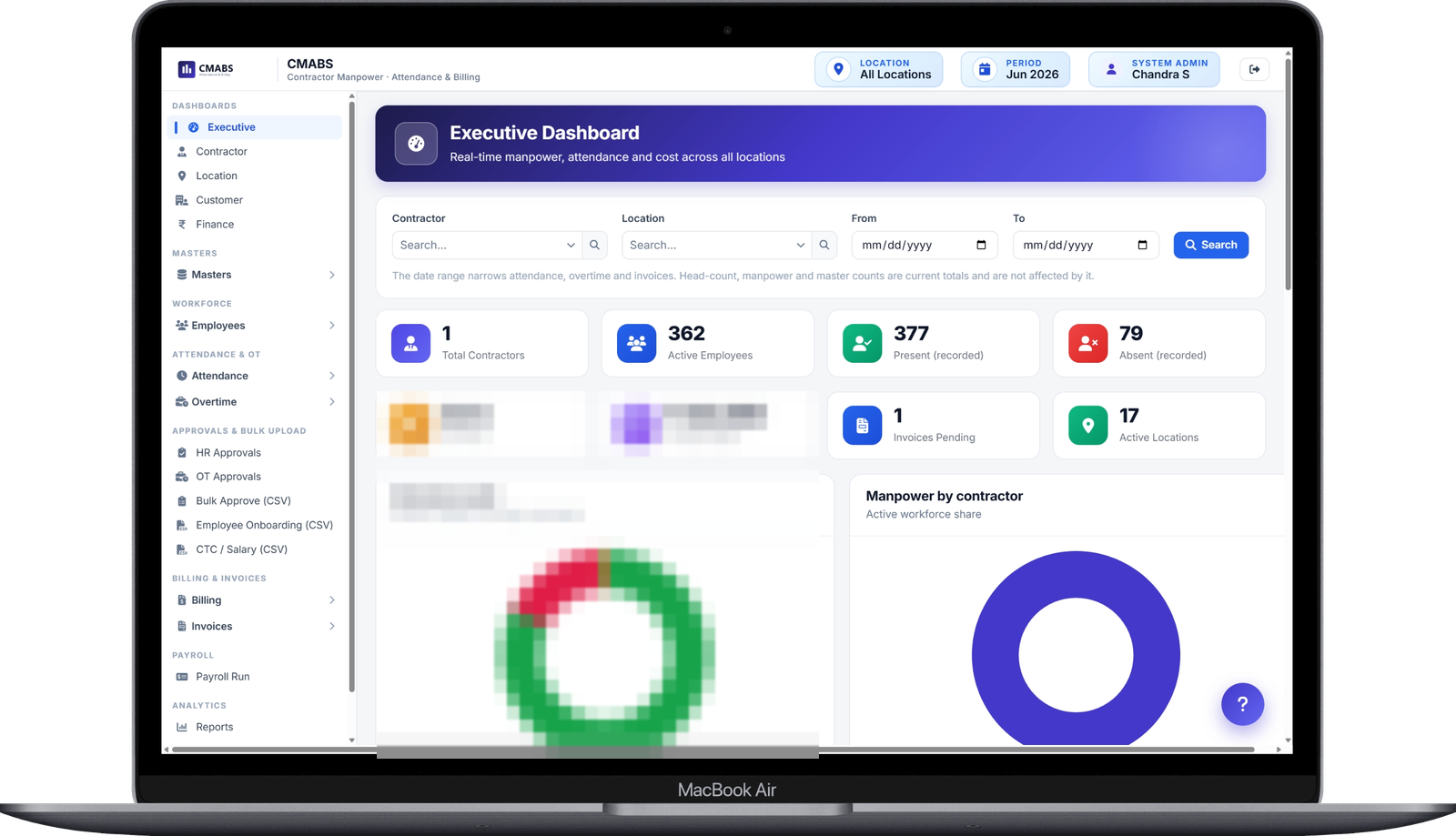


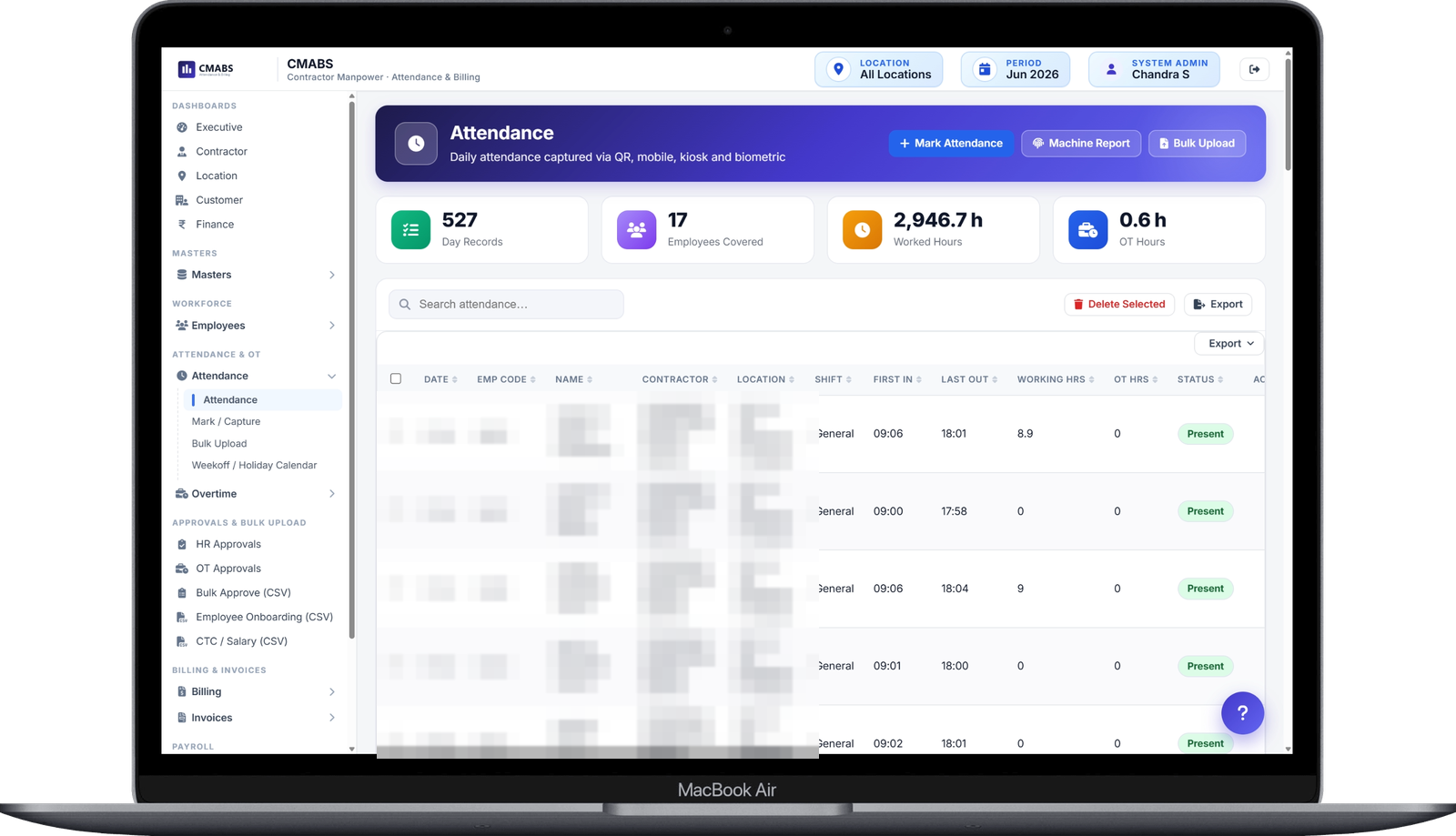


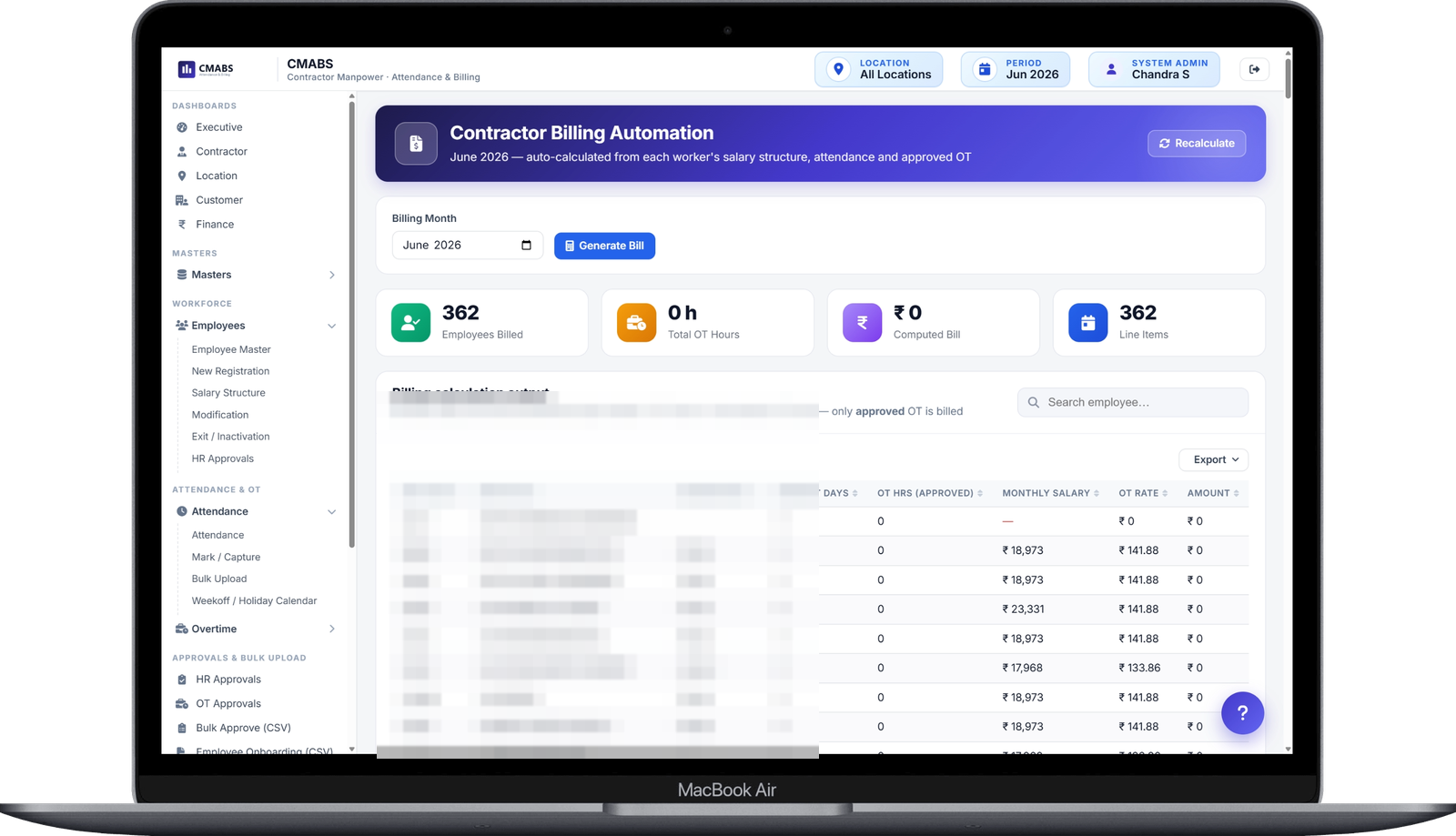


"The point of this system is not that it calculates faster. It is that when a contractor disputes a deduction, or an auditor asks why a Sunday was unpaid, or a worker asks where their overtime went, there is a single record that answers the question — and everyone was looking at it the whole time. Agreement before the invoice is cheaper than reconciliation after it."
Each step consumes what the previous step produced. There is no point at which a number is re-entered by hand.
Worker registered, approved by HR and issued a QR badge
Scanned at the gate, punched on mobile or imported from biometric
Hours past shift end queued for a named approver
Paid days, statutory deductions and employer contributions
Cost apportioned by each location's share of present days
Contractor invoice reconciled, finalised and marked paid
Any operation where a large contract workforce is billed monthly against attendance — and where the gap between the register and the invoice is real money.
Shift-based picking, packing and loading crews across multiple client warehouses, each billed to a different customer.
Production lines staffed by several contractors at once, with overtime that has to be approved before it is paid.
Hub and spoke operations where workers move between locations mid-month and the cost must follow them.
Headcount that swells for a peak season and has to be onboarded, badged and billed without the process falling over.
Housekeeping, security and maintenance crews spread thinly across many sites under one agreement.
The supplier side of the same relationship — proving your own attendance and getting invoices cleared without a monthly argument.
A Flutter app for Android and iOS, used by the people actually standing at the gate. It talks to the same API and obeys the same scoping as the web application.
Point the phone at a worker's QR badge. The punch alternates IN and OUT by itself, so there is no mode to get wrong and no double entry at shift change.
A damaged badge or a new joiner is punched by name from the same screen, and the entry is tagged with who recorded it.
The supervisor sees exactly the workers in their own scope — their contractor, their location — and nobody else's.
Who is in, who is still out and how the shift is tracking, without walking back to a desk to find out.
Gate scanning is a Security function, and is also available to Location Managers and System Admins.
You should not have to replace a working biometric machine or re-key a payroll export to adopt this.
Import punch files from the readers already installed at your gates. Machine-sourced days get their status re-derived from hours, so a half shift is not paid as a full one.
Bulk worker onboarding, bulk attendance and salary structures import by CSV, each with a validation pass that reports every rejected row before anything is written.
A token-authenticated JSON API for login, roster, attendance and QR punching — the same contract the Flutter app uses, available to yours.
Contractors upload their own invoice files against a billing period, stored with the verification record rather than in somebody's inbox.
Verified billing and payroll figures export cleanly into your accounting or ERP ledger, including iDempiere and SAP where we have implemented both.
A standard Java WAR on PostgreSQL. Run it on your own servers, in your own cloud tenancy, or let us host it — the choice does not change the product.
It is not a generic HRMS with a billing bolt-on. It was written for the contract-labour problem specifically, and the difference shows in the rules.
Thirty reports are a lot to learn. The optional AI layer reads the same scoped data and answers in plain language, so a location manager does not need to know which report holds the answer.
NDA-first · 30-minute walkthrough · we can demonstrate on your own numbers
Workforce data is personal data — names, identifiers, wages. We protect it, and your intellectual property, with legally binding agreements from the first conversation.
Every engagement starts with a signed NDA — before any discovery call, demo or data exchange. Your code, data and business logic stay confidential.
You own 100% of the source code and intellectual property. No vendor lock-in, ever.
We build trust through transparency, reliable delivery, and ongoing support that grows with you.
The fastest way to know whether this is worth doing is to run a month you have already paid for and see whether the numbers match. We do that before any financial commitment.
Give us one closed month of attendance and one contractor invoice. We load it and show you what the system says the bill should have been.
Every difference traced to a cause — an unapproved overtime claim, a half day paid as full, a sandwiched weekly off.
Your statutory rates, wage base and shift patterns set up as they actually are — so you are judging your own numbers, not a demo tenant.
Walk away with zero obligation. Flexible engagement models — fixed price, time and materials, or a dedicated team.
Curious what last month should have cost?
Book a Free AssessmentNo credit card required • No commitment • Response within 24 hours
Bring us one month of attendance and one contractor invoice — we will show you exactly where the two disagree.
