

HRMS Buyer's Guide 2026 — Choose the Right HR Software
A practical, vendor-neutral walkthrough of the decisions every HR and procurement leader must make before signing an HRMS contract in 2026 — what HRMS actually is, the modules that matter, India statutory must-haves, integration depth, cloud vs on-premise, realistic cost, and the pitfalls that derail go-lives.
HRMS Buyer GuideHRIS vs HCMIndia ComplianceCloud vs On-PremRFP & Evaluation
By SCM Software Lab
· Updated
· Published
· Reading time ~12 min
This guide is written from the perspective of a buyer evaluating HRMS software. It does not promote any single product — use it as a yardstick against every vendor on your shortlist.
Table of Contents
1. What Is HRMS — and How Is It Different from HRIS and HCM?
Before you compare vendors, get the vocabulary right. The terms HRIS, HRMS and HCM are used interchangeably in sales decks, but they describe three different layers of HR software. Mixing them up is the most common reason buyers shortlist the wrong product.
- HRIS — Human Resource Information System. The system-of-record. Employee master, contracts, document vault, organisation structure, basic workflows. HRIS is where HR data lives; transactions happen elsewhere.
- HRMS — Human Resource Management System. Everything HRIS does, plus the transactional engines that HR runs on month after month: attendance, leave, timesheet, payroll, statutory, employee and manager self-service. This is the layer most Indian buyers actually need.
- HCM — Human Capital Management. The widest umbrella. HRMS plus strategic talent modules — recruitment/ATS, onboarding, performance (OKR, KPI, 360°), learning and development, succession planning, workforce analytics and people insights. HCM is where the people-strategy conversation happens.
The practical implication: a vendor with a polished HRIS but a fragile payroll engine will collapse in your second month; a vendor with great HCM marketing but no real India statutory engine will fail your first audit. During evaluation, score every shortlisted product on all three layers separately. If you would like to see what a full, modern offering covers, you can explore the full HRMS module suite for the depth a vendor should be matching against.
A serious HRMS in 2026 should run the complete hire-to-retire journey from a single employee record, with role-aware self-service for employees and managers, a documented audit log, and a statutory engine that the vendor — not you — patches every quarter.
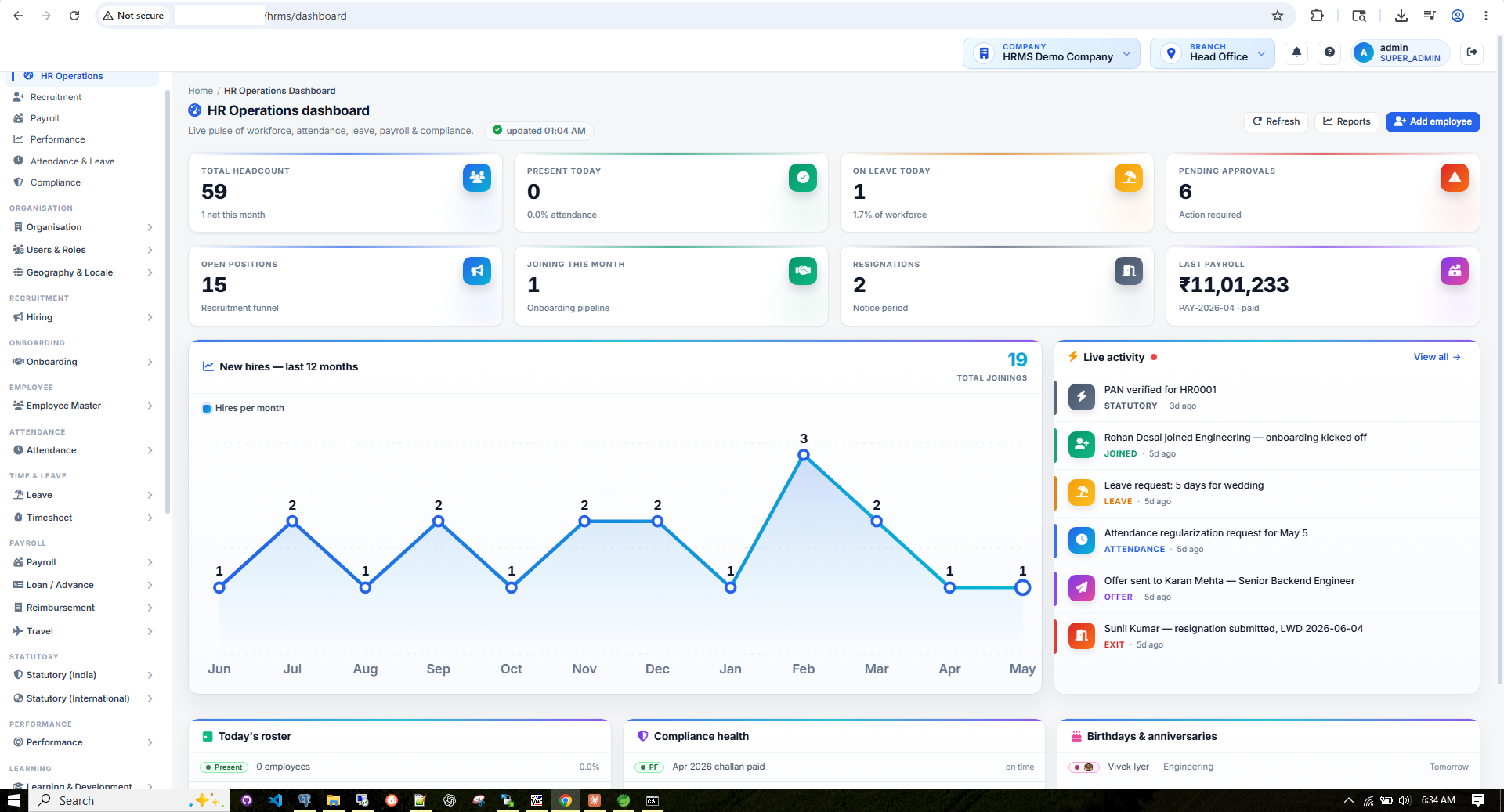
Figure 1 — A Modern HRMS Dashboard
What a buyer should expect to see on day one — a role-aware screen with headcount, attendance, leave, payroll and compliance widgets in a single view.
2. Core Modules — Map Vendor Catalogues to Your Real Work
Every HRMS sales deck opens with the same module list. The list is necessary, but it is not how you choose. A buyer's job is to translate that list into your calendar — which screens HR opens daily, which run monthly, which appear once a year. If you would like the full vendor-side catalogue as a reference yardstick, you can explore the full HRMS module suite; on this page we focus on how to evaluate what is shown to you.
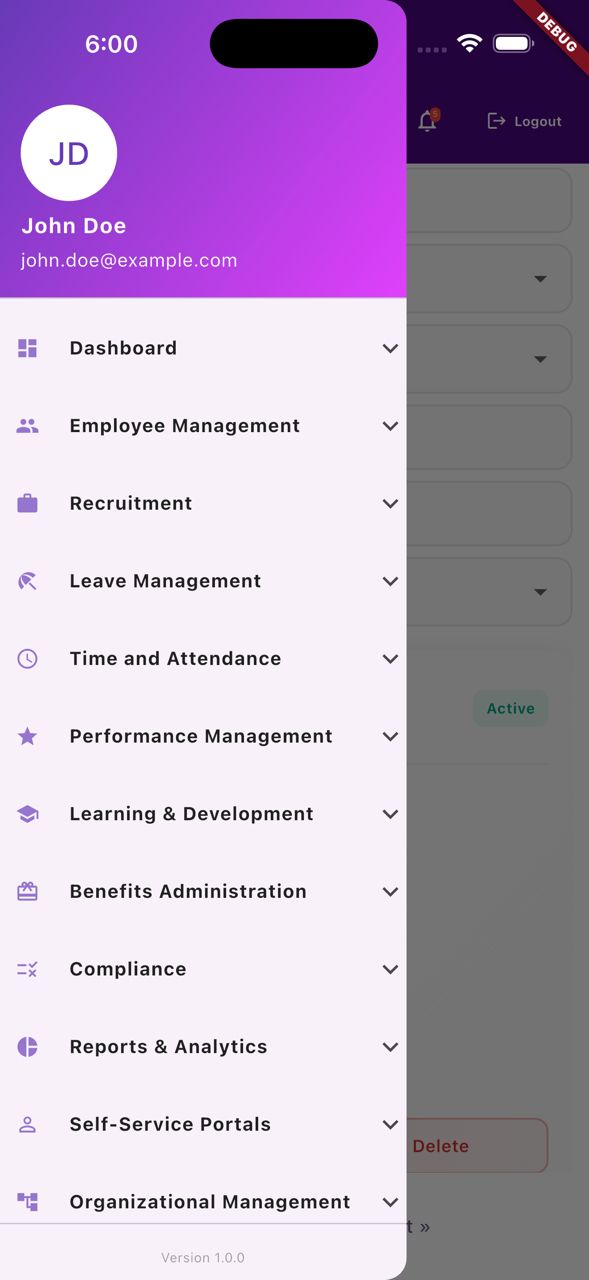
The six buckets a credible HRMS must cover
Treat these as the minimum surface area. A vendor strong in three of six will create silos within eighteen months — usually as an Excel sheet sitting between two modules.
- Foundation. Organisation, branches, departments, designations, grades, cost centres, work locations, holiday calendar, shifts, week-off patterns, approval matrix, RBAC, country and locale setup.
- Hire to Joining. Recruitment / ATS, candidate pipeline, offer letter, day-one onboarding checklist, asset issue, document collection, employee master with KYC, family, education, bank and statutory IDs.
- Daily Operations. Attendance (biometric, GPS, regularisation, OT, shift roster), leave with a configurable policy engine, project timesheet, HR helpdesk, asset tracking.
- Pay & Money. Payroll engine with formula builder, payslip, bank transfer file, loans and advances, reimbursements, travel and per-diem, plus India and international statutory.
- Talent. Performance with OKR / KPI / 360° / calibration, learning and development, engagement, surveys and recognition.
- Exit & Reporting. Resignation, clearance, gratuity, final settlement, exit interview, document vault, ESS and MSS on web and mobile, role-aware dashboards and a clean reports library.
How to score modules the right way
Stop counting features. Score for fit and depth.
- Map to your hire-to-retire process map first. If you do not have one, build it on a whiteboard before the first demo. Then ask each vendor to walk their product against your map, not their menu.
- Open the employee master. Count tabs and field groups. A shallow employee master is the strongest leading indicator of a shallow product.
- Test the leave policy engine in configuration, not code. Ask the vendor to model a state-specific CL/SL rule, a sandwich-leave rule and a comp-off rule in front of you. If the answer is "we can customise," walk away.
- Insist on a per-bucket coverage matrix. Vendors love to ship a long feature checklist; you want a heat-map of where they are deep and where they are thin.
- Demand a working ESS and MSS demo on a phone — not a tablet. Self-service adoption is the single biggest predictor of HRMS ROI.
Heuristic: a vendor strong in Pay & Money but weak in Hire-to-Joining will create silos within eighteen months. A vendor strong in Talent but weak in Daily Operations will lose the HR team in month two. Balance matters more than any single deep module.
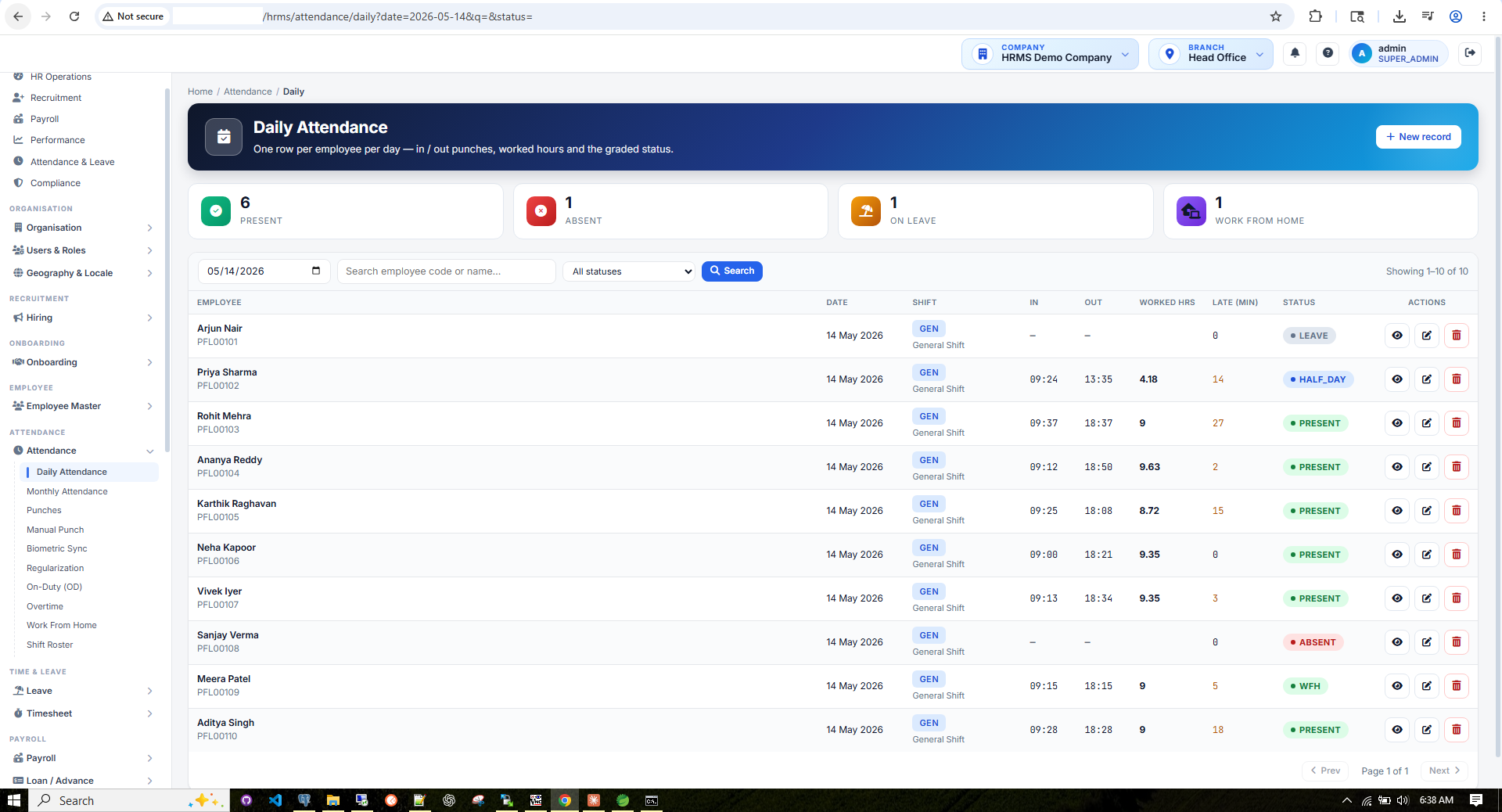
Figure 2 — Daily Attendance Grid
What a working attendance screen looks like — biometric punches, status markers and inline regularisation requests on one grid. If a vendor cannot show this on a phone, mobile adoption will fail.
India-Specific Compliance Musts
For Indian businesses, statutory compliance is the single most common reason an HRMS evaluation fails after go-live. Your HR management solutions shortlist must natively cover the following 13+ statutory areas — not via "add-on", not via Excel templates, and ideally with auto-updates pushed by the vendor every quarter.
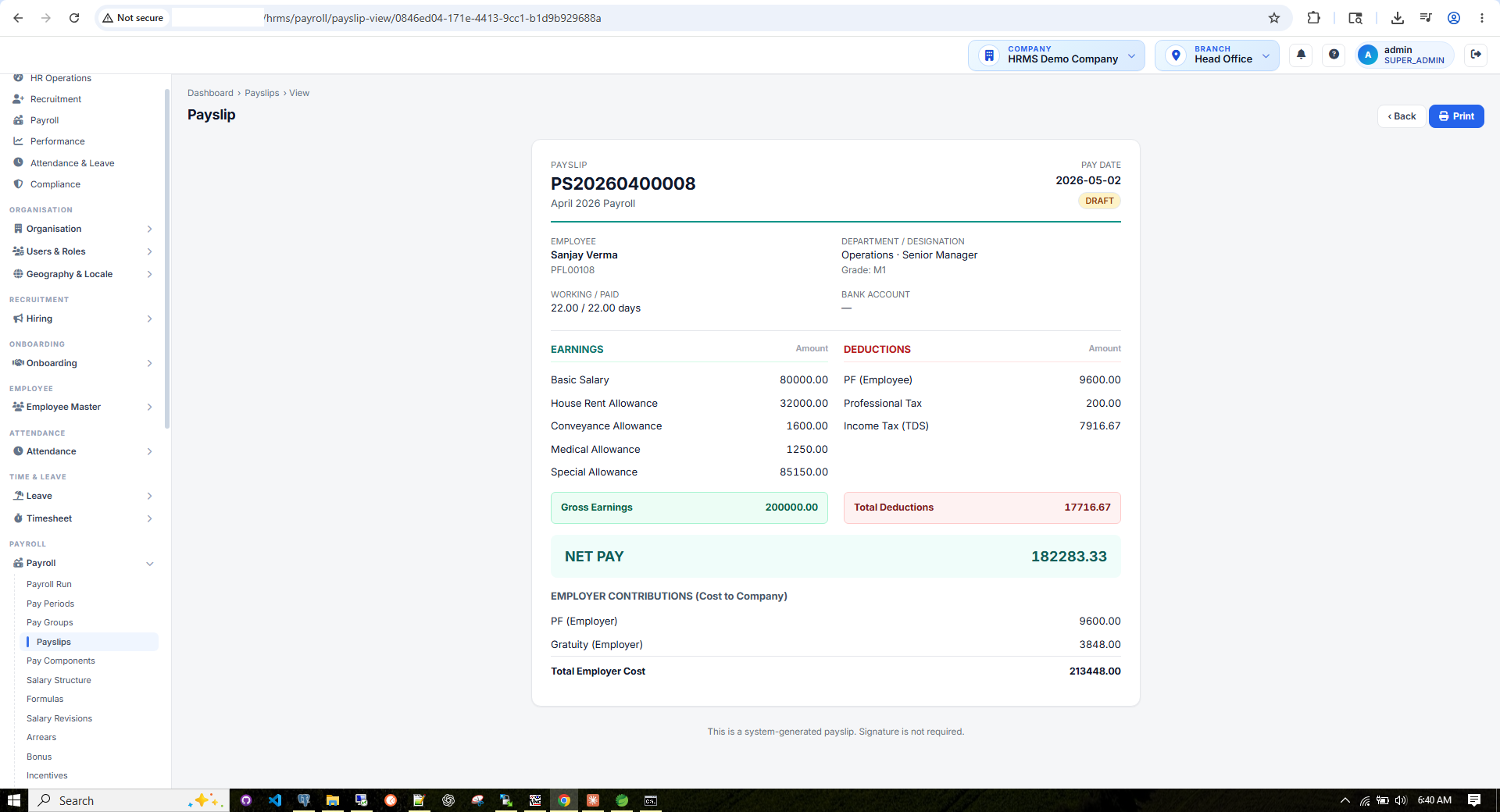
Figure 5 — Statutory Line Items on the Payslip
How PF, ESI, PT, LWF and income-tax deductions appear once the statutory engine has run.
Mandatory statutory engine — what to look for
- PF (Provident Fund / EPFO) — UAN, KYC linking, monthly ECR (Electronic Challan-cum-Return) generation, contribution split, exempted establishments
- ESI (Employees' State Insurance) — wage-ceiling check, contribution calculation, monthly ESIC return
- Professional Tax (PT) — state-wise slabs (Maharashtra, Karnataka, WB, TN, AP, Telangana …) with month-of-deduction rules
- LWF (Labour Welfare Fund) — state-wise frequency (monthly / half-yearly / annual)
- Income Tax — Old & New Tax Regime — regime selection per employee, automatic re-projection on regime switch
- Investment Declarations & Proof tracking — 80C, 80D, HRA, LTA, NPS, home loan interest, with proof upload & verification workflow
- Form 16 (Part A + Part B) — auto-generation from TRACES + payroll data, digital signature
- Form 12BA — perquisites statement attached with Form 16
- Form 24Q — quarterly eTDS return with annexure I & II ready for upload to NSDL/Protean
- Gratuity — eligibility, calculation (15/26 rule), provisioning, payment at exit
- Superannuation — trust-managed scheme tracking, contribution & payout
- Challan generation — PF, ESI, PT, TDS challans ready for bank/portal payment
- Statutory Returns — monthly, quarterly & annual returns auto-prepared from payroll data
- POSH — workplace harassment policy, case management, annual compliance reporting
- Code on Wages & new labour codes — readiness for wage definition, gratuity-on-5-yrs, social security code
- Shops & Establishments Act — state-wise registration and renewal workflows
Ask each vendor: "Show me a Form 16 generated from your system, with Part B and Form 12BA, for an employee on the new tax regime, signed digitally." If they can't demo this in 20 minutes, the statutory engine is not production-grade.
HRMS Integrations
An HRMS that can't talk to the rest of your stack becomes a data island within a year. At minimum the platform must integrate with these five categories, and ideally expose a documented REST API so your own engineering team can build on top.
1. Biometric attendance devices
Real-world Indian offices run on biometric / face / RFID terminals. Your HRMS should natively support ZKTeco, ESSL, Matrix, Mantra and similar devices — either via the device SDK, a push-style HTTP endpoint, or a polling agent that drops punch logs into the attendance module. Manual CSV imports are a red flag.
2. Bank API for salary disbursement
Payroll must emit a bulk transfer file that any major Indian bank accepts: NEFT / IMPS / RTGS bulk salary upload formats for HDFC, ICICI, Axis, SBI, Kotak. Better vendors offer direct bank API integration with payment confirmation back into the HRMS so finance closes the books same-day.
3. Accounting / ERP journal export
Payroll postings (salary expense, statutory liabilities, provisions, advances, reimbursements) must export as a journal voucher into Tally, Zoho Books, SAP, iDempiere and similar. Cost-centre and department dimensions must carry across.
4. Email & SMS gateways
Offer letters, payslip distribution, leave approvals, OTP-based ESS login, FNF letters — everything depends on a reliable email + SMS layer (SendGrid / SES / Amazon SNS / MSG91 / Gupshup). Ensure delivery logs are queryable.
5. ERP / GL integration patterns
For enterprises, plan a bidirectional bridge: HRMS pushes employee master, cost-centre and payroll journals to the ERP; ERP pushes back GL approval status, budget allocation and project codes for timesheet billing.
Other integrations to verify
- Identity / SSO — Azure AD, Okta, Google Workspace, SAML 2.0 / OIDC
- Calendar — leave + holiday sync with Outlook / Google Calendar
- BI tools — Power BI / Tableau / Metabase against a reporting replica
- Document signing — DocuSign / Adobe Sign / eMudhra for offer letters and policies
Integration Partners At a Glance
The seven integration categories every HRMS evaluation should benchmark — biometric, bank, accounting, comms and collaboration.
Biometric — ZKTeco / ESSL
Plug-and-play with live punch sync, device health and missed-punch alerts.
Bank — NEFT / IMPS
HDFC, ICICI, SBI, Axis, Kotak file formats with pre-export validation.
Tally
Tally XML journal export with cost-center splits and project tagging.
Zoho
Zoho Books CSV import-ready, with auto-mapping of payroll components.
Email Gateway
SendGrid, SES, Postmark with delivery logs, bounce tracking and OTP.
SMS Gateway
MSG91, Gupshup, Twilio for approvals, payslip alerts and OTP login.
Slack / Teams
HR bot for leave, approval, payslip and policy queries in workspace chat.
SSO — Azure AD / Okta
SAML 2.0 / OIDC single sign-on with role provisioning from identity store.
Cloud vs On-Premise
Roughly 90% of new HRMS buyers in 2026 choose cloud — SaaS pricing, instant statutory updates, mobile-first design, and zero infrastructure overhead. On-premise still makes sense for:
- Large enterprises with strict data-residency or security policies
- Businesses in highly regulated industries (defense, certain BFSI, government)
- Cases where HRMS data must stay inside an air-gapped network
- Buyers who already own datacenter capacity and want predictable OPEX
Look for a platform that supports both
The strongest position is a single codebase that deploys either way. Our HRMS, for example, is a Spring Boot 3 / Java 17 / PostgreSQL application that runs as a multi-tenant cloud by default (per-company + per-branch data isolation, JWT authentication, role-based scopes, audit log, optimistic locking, soft-delete pattern) but can be deployed on-premise on a customer's VM or Kubernetes cluster without code branching. The same statutory engine, same JSP-rendered pages, same RBAC layer — just a different deployment target.
If your vendor maintains two separate products for cloud and on-prem, you are signing up for divergent roadmaps and double the upgrade pain.
Realistic HRMS Cost
Indian SMB cloud HRMS pricing in 2026 typically ranges ₹50–₹200 per employee per month, with implementation as a one-time line item. On-premise licenses generally land between ₹5 lakh and ₹25 lakh one-time for the perpetual license, plus 18–22% annual AMC.
| Company Size | Cloud HRMS (per emp/mo) | Implementation (one-time) | On-Prem License (one-time) |
|---|---|---|---|
| Micro (<25 employees) | ₹50–₹100 | ₹25k–₹1L | Not recommended |
| Small (25–100 employees) | ₹75–₹150 | ₹50k–₹2L | ₹5L–₹10L |
| Mid-market (100–500) | ₹100–₹200 | ₹2L–₹10L | ₹10L–₹20L |
| Enterprise (500–5000) | ₹150–₹300 | ₹10L–₹25L | ₹20L–₹25L+ |
| Large enterprise (5000+) | Negotiated | ₹25L–₹1Cr+ | Negotiated |
Hidden costs nobody mentions in the demo
- Implementation & data migration — 1.5–3x the year-1 licence for a mid-market rollout
- Training — HR team, payroll team, line managers, all employees on ESS / mobile
- Statutory updates — budget changes, new tax slabs, PF wage ceiling revisions: verify the vendor pushes these free
- Support & AMC — typically 18–22% of license per year for on-prem; bundled for cloud
- Custom reports & integrations — biometric, bank API, GL export — budget 15–30% of project
- Customisations — bespoke leave policy, salary structure, approval workflow — quote per change
Vendor Evaluation Checklist
Hand this list to procurement and walk every shortlisted vendor through it line-by-line. Anything they cannot demo live should be marked as a gap, not a roadmap promise.
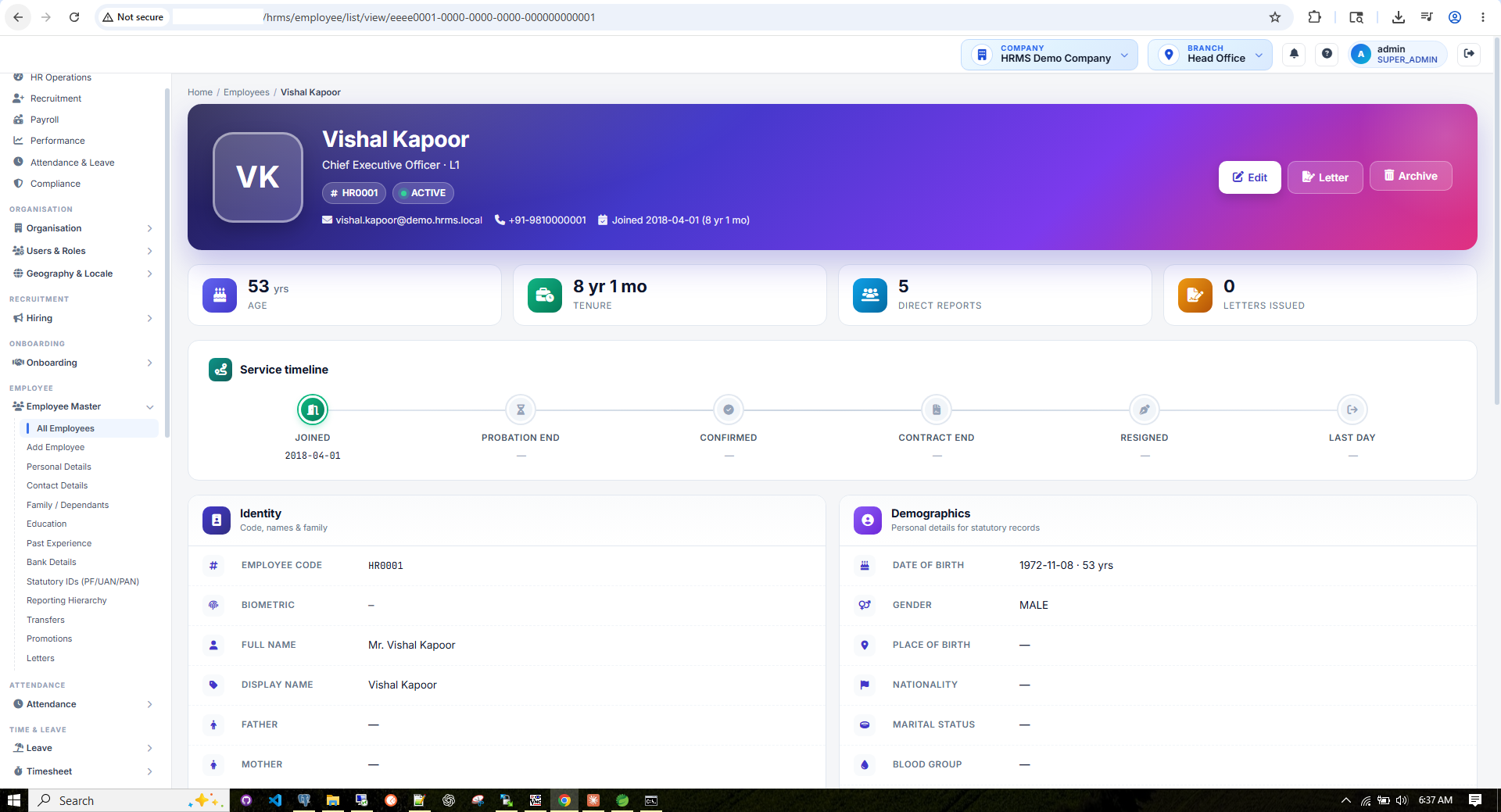
Figure 6 — What an Employee Record Should Look Like
Open an employee record in any vendor demo — the depth of fields, tabs and statutory linkages is the single best proxy for HRMS maturity.
Architecture & data
- Multi-tenant data isolation — per-company + per-branch row-level scoping, never a shared table without tenant_id
- Role-based access control (RBAC) — granular page + action permissions, scoped to data segments
- Comprehensive audit log — who-changed-what-when on employee, payroll, leave and statutory data
- Soft-delete pattern — no destructive delete; records retained for audit and regulatory queries
- Optimistic locking — concurrent edits handled without silent data loss
- Modern stack — e.g. Spring Boot 3 / Java 17 / PostgreSQL, server-rendered with role-aware dashboards
Compliance & payroll
- India compliance auto-updates — PF / ESI / PT / LWF / IT slabs pushed quarterly at no extra cost
- Payslip PDF generation — templated, bulk-emailable, password-protected, archived
- Form 16, 12BA & 24Q — produced end-to-end from inside the system
Operations & user experience
- Biometric integration — native ZKTeco / ESSL / Mantra support without custom scripts
- Mobile ESS — payslips, leave, attendance, claims, declarations on the phone
- Role-aware dashboards — HR Ops, Recruitment, Payroll, Performance, Attendance & Leave, Compliance
- Reports library — headcount, attrition, payroll, statutory, cost-centre, with export to Excel / PDF
- Document management — letters, contracts, policies with versioning & e-acknowledgement
- File upload & storage — secure, virus-scanned, per-tenant storage with retention rules
- Documented integration APIs — REST + webhooks, sample payloads, SLA on API uptime
Scale & commercials
- Scalability — verified employee count on the largest live customer (ask for the reference)
- Uptime SLA — contractual 99.9%+ with penalty clauses
- Security certifications — ISO 27001, SOC 2 Type II, India DPDP readiness
- Data export & exit clause — full export of your data in a usable format, any time
- 5-year TCO — not just year-1 pricing; include statutory updates, support, customisations
Common HRMS Buying Pitfalls
- Overbuying modules you won't use — start with core (employee master, attendance, leave, payroll, ESS) and expand once stable
- Trusting the sales demo — insist on a hands-on trial with your actual employee data and policies
- Ignoring change management — HRMS success is 40% software, 60% adoption: budget for training and internal champions
- Under-budgeting integration — API hookups with ERP / banking / attendance are 15–30% of the project
- Skipping the exit clause — contract must specify data return format and termination assistance
- No audit trail — if the system can't tell you who changed a salary record at 2 AM last Tuesday, you have no defence in an audit or wage-dispute case
- Can't export a GL journal — payroll without a Tally / SAP / Zoho-ready journal export means manual re-keying and reconciliation pain forever
- Rigid leave-policy engine — if the vendor can't model your existing leave rules (state-wise CL/SL, accrual frequency, comp-off, sandwich rule) in configuration, walk away
- No support for international statutory if you expand abroad — if there's any chance of opening a Singapore / Malaysia / UAE / Australia entity in 24 months, pick a vendor that already covers those statutory regimes
- No multi-tenant isolation — "we'll deploy a separate instance per company" sounds reasonable until you need to upgrade 40 of them
Need help choosing or implementing an HRMS?
We build cloud and on-premise HRMS on a Spring Boot 3 / PostgreSQL multi-tenant stack — with a full India statutory engine (PF, ESI, PT, LWF, Income Tax, Form 16, Form 24Q, Form 12BA, Gratuity, Superannuation) and international payroll support. Free POC available.
Request an HRMS Demo →Your users ask. Your app answers.
Forms and filters are dead UX. We embed an AI conversation layer into the apps we ship — so end users get answers, charts and actions in seconds, without learning your menu tree.
Show me top 10 customers by revenue this quarter
U
Here are your top 10 — total Q3 revenue ₹4.82 Cr.
Acme Industries₹78.4L
Flipkart₹62.1L
Tata Steel₹54.8L
Draft a renewal offer letter for Priya Sharma
U
Done — drafted using her grade revision and CTC, sent to HR review queue. Open draft →
Ask anything…
Built with Anthropic Claude
An AI layer inside your product — not bolted on.
Every page we build now ships with an optional AI assistant that reads your real data — sales, payroll, inventory, tickets — and answers in natural language. No new tab, no separate chatbot tool. Just a conversation, where the work happens.
Behind the scenes we also build with Claude — pairing it on architecture, code generation, test writing and migrations. The same AI that writes our code now lives inside your app to serve your customers.
Natural-language queries
Voice input
Multi-language
Document understanding
Action shortcuts
Personalised summaries
1
Ask
Your user types — or speaks — a plain English question or instruction inside your app.
2
Understand
Claude maps intent, calls your APIs with the right filters, and stays inside your role-based access scope.
3
Answer
The answer lands as a chart, table, summary or one-click action — right inside your app, not in a side panel.
Add an AI layer to your app
NDA-first · 30-minute strategy call · we ship a working prototype in two weeks
Don't Pick the Wrong Vendor — Zero-Risk POC
Score every shortlisted vendor against the checklist above with a hands-on POC on your real data — org chart, salary structure, biometric file, last month's payroll. Decide on screens you used, not slides you watched.
- Free 14-day trial
- No credit card required
- Setup in 24 hours
+91 90524 31162 | sales@scmsoftwarelab.com
Parallel Payroll Run in 14 Days
Upload your last payroll, biometric file and statutory profile. We match your numbers to the rupee, generate your payslips, your statutory challans, your GL journal and your bank file.
If we can't match, you walk away. No deck, no slides — just your numbers, your screens.
Ready to move your HRMS evaluation forward?
Spin up a sandbox in 24 hours, run your last payroll on it in two weeks — score every vendor on the same yardstick, with your real data.
Talk to an HRMS Expert